Wednesday, August 3, 2011

How to Change Blogger Templates

You feel bored with your current template? Take it easy. I have a solution for you. You do not need to worry. Due to the bloggertemplate can be changed anytime.
Jump to the tutorial course. Follow the steps below


First Sign In to http://www.blogger.com
Once you sign in, you'll get something like the picture below.Click the menu design. As in the picture below


Second
After you click the menu design, click the menu again TemplateDesigner. Wait until the process is complete. Once the processis complete, will look like below


Third
Choose a template according to your choice. If so, click APPLY to BLOG located on the upper right corner. Then click on Back To BLOGGER. Now look at your new template.


Thank you for reading my article.

How to Remove a Widget on Blogger

Not long ago I was giving a tutorial how to install a widget onblogger. Well, this time I will discuss is the opposite of that.Namely how to remove a widget on blogger. Follow the step


First  
Sign In first to http://www.blogger.com
If you already Sign In, there will be a display like this
Click the design


Second
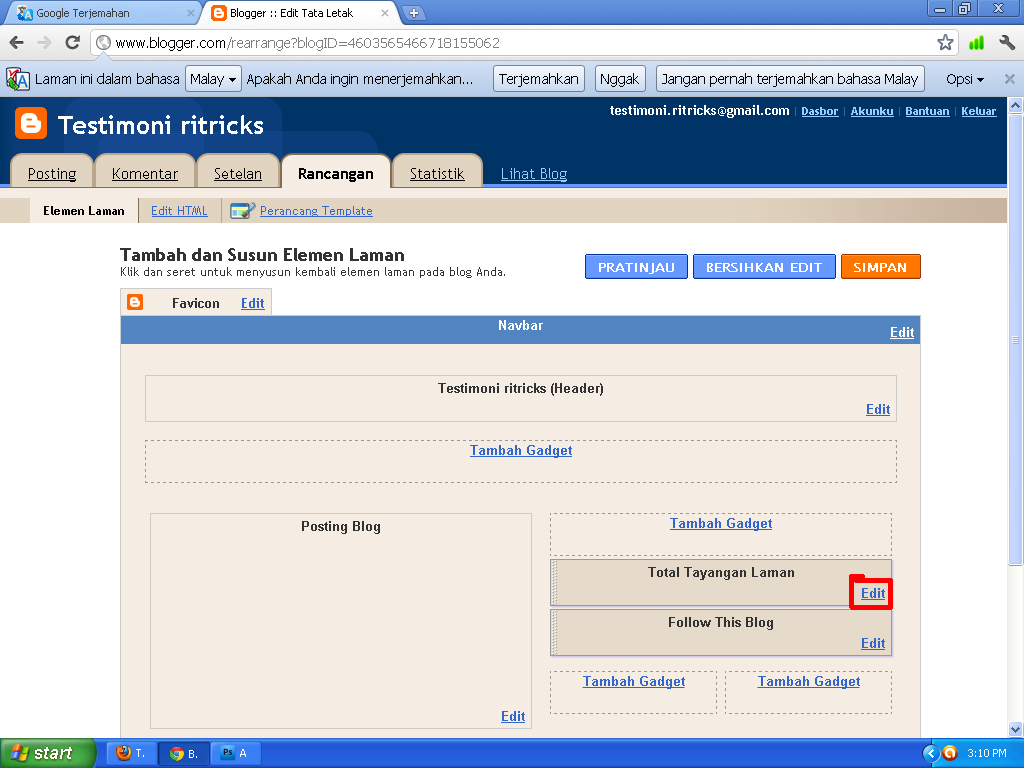
If you've opened the menu design, you'll get something like this


Third
Select the widget to be deleted. For example widget TOTALimpressions page. If you want to delete the widget, click EDIT onthe widget. Like the picture above.
 

Fourth
After you click on EDIT, will emerge a new window. as shown below. Then click Delete.


If it is removed, there will be display as shown below


Congratulations. You have successfully deleted your widget.Thank you for reading the tutorial from me.

Monday, August 1, 2011

Adds Widget In Blogger

If on the first article, I just explained about the notion PageElements course, now I will teach you how to add widgets to bloggers.


First
Sign In first in http://www.blogger.com
Once In Your Sig, you will get something like this. Click on the DESIGN.


Second
After that, click Add Widget.


NB: For this problem, it's up to you, you would click the AddWidget on which part. Depending on each person.
 

Third
After you click the Add Widgets, automatically there will be a newpicture windows like this


Fourth
Select the widget you want. Blog Stats example. If you choose toadd the Blog Stats widget, click the Plus sign on the right as shown above.


If you already click the plus sign, click SAVE. As shown in the figure below.


Now you see your blog. what were the results. For in my blog, the result is like this


Congratulations. You have successfully made the widget. Thank you for reading my article.

How To Write Articles On Blogger

If you're new in the world of bloggers, you should and must followthis tutorial. Because of all the tutorials bloggers, the mostimportant thing is about How To Write Articles On Blog.


Follow the steps below
1. Sign In at http://www.blogger.com
2. Once you sign in on blogger, you'll get something like this


3. Click the New Entry. After you click New Entry, you will get something like this


- Title: Write Article Title Here Your Blog

4. If so, click Publish Post

You have successfully publish your article. Thank you for readingmy article.

Know the Menu Design On Blogger

The design of the menu is the menu, where with this menu, you can design your blog or you can also add widgets whatever you like.


Menu view the design of each blog is different. Depending on Blog Template respectively. To view the menu design on my blog, is like this.


To open the menu design is quite easy
1. Sign In at the blogger
2. Open the menu in the menu Design Dashboard

Okay. Quite up here first. Thank you for your visit.

How To Change Domain in Blogger

Have you ever felt bored with your domain? Is there any desire tochange your domain? Take it easy. You do not need to worry.Since the domain on blogger can be replaced. But remember. Ifyou want to change domains, you'd better think about it first.


Because, if your blog is already widely known and entered intosearch engines then you change the domain, your blog will be hard to find people, and you have to start again from scratch. The point of beginning is, the promotion of a blog from scratch.Therefore, you should if you want to change domains, have a blog that is still new, still has not entered a search engine.

How To Change Domain Very Easy. Follow my instructions
First
After you Sign In at the blogger, you'll get something like this.Click Settings

 
Second
After you click on Settings, select the menu Publishing. As shown in the picture below.


1. Replace Domain with the domain you want
2. Enter word verification
3. Click Save Settings

And, congratulations. You have successfully changed yourdomain. Thank you for reading my article.

Setting Blog Part 3

Once you follow my guide on Setting Blog Part 2, now you'veentered the final stages of setting the blog. Namely, now you'vecome to the third. Follow the instructions from me.


First
Sign In at http://www.blogger.com
Once you Log In at the blogger, you'll get something like this.Click Settings


Second
Once you click the Settings section, select the Commentssection. See Figure below this.


Third
Once you open the comments section, replace the WHO can not comment, to ANYONE. As the picture above.

 
Fourth
After, click Save Settings.


NB: To Show the Word verification. It's up to you. Personalsrespectively.

Now you've finished setting the stage bloggers. Thank you forreading my article.