Blog is listed on search engines. Now your next task is, you have to take care of the blog is fine. The goal is to link or widget on a blog no one is damaged. And we are always updated blog.
Care First
If you're online every day, do post articles at least one day a time.And dilakuan every day. But if you can not, you simply post articles at least 1 Week 3 articles.
Both treatments
Open the home page of your blog to see the state. Whether your blog is neat or not. If it is not neat, trim your blog immediatelyproficiency level.
Third treatment
Open up all your blog pages. And look at the check whether the links that are still functioning or not. If not, immediately replaced.
I think that's pretty important things to do in caring for your blog. Ifyou have any other way, can share here.
Thank you for reading my article. May be useful for us all.
Showing posts with label Blogger. Show all posts
Showing posts with label Blogger. Show all posts
Wednesday, August 24, 2011

How to Submit blog to Search Engines
Nearly a month I have not updated the blog. This is because I am still busy with school. On this occasion, I will discuss How tosubmit Blog to the Search Engine.
To register your blog on search engines is very easy. Today, I will teach you how to submit your blog to SEARCH ENGINE foremost and most famous. Namely Google, Yahoo and Bing.Now we go directly to the tutorial course.
First
Once you open it there will be a display like this

- Enter your blog address in the first column
- Enter the keyword blog under the first column
- Enter the word verification as in the picture that has been provided
- Then click on Add Url
After you click on Add Url will notice that your blog has enteredthe search engines like the picture below

Second
Register your blog on search engines BING
- Go to this url http://www.bing.com/webmaster/SubmitSitePage.aspx Once you open it there will be a display like this

- Enter the verification word in the first column
- Enter your blog address in the second column
- If you have, click Submit URL After you click on Add Url will notice that your blog has entered the search engines like the picture below

Third
Register your blog on search engines YAHOO
- Go to this url http://siteexplorer.search.yahoo.com/ Once you open it there will be a display like this

- Enter your blog address in the box on the right as on the image above
- Then click on Add My Site
- After you click on Add My Site, now your blog has been included in the search engine Yahoo
Congratulations. You have successfully registered the blog on search engines.
Thank you for reading my article. May be useful for us all.
Sunday, August 7, 2011
Know Your Search Engine
Search engine is a search engine in the internet world. So, if you want to find something, you are touching using search engines.
Examples of the most famous search engine in the Internet worldis
1. Google
Google is the main search engines on the internet world.
http://www.google.com
2. Yahoo
Yahoo is second only to google search engine
http://www.yahoo.com
And there are many more kinds of search engines that you can find on google.
If, your blog or your website and blog search engines are detected you are on the first page, you can already called MASTER. because, to get first position in search engines requires sacrifice.
For that, on this blog, let us learn together about search engine optimization or SEO.
Thank you for reading my article. May be useful.
Examples of the most famous search engine in the Internet worldis
1. Google
Google is the main search engines on the internet world.
http://www.google.com
2. Yahoo
Yahoo is second only to google search engine
http://www.yahoo.com
And there are many more kinds of search engines that you can find on google.
If, your blog or your website and blog search engines are detected you are on the first page, you can already called MASTER. because, to get first position in search engines requires sacrifice.
For that, on this blog, let us learn together about search engine optimization or SEO.
Thank you for reading my article. May be useful.
How to Create a Page
In a long post, you have learned how to write articles. Now is how to create pages. This is very different from how to create pages.When writing articles, we can comment an article. However, if you create a page, can not be commented upon. For example ABOUT page on this blog.
To Create a Home Page is very easy. Follow the instructionsfrom me.
First
Sign In at Blogger
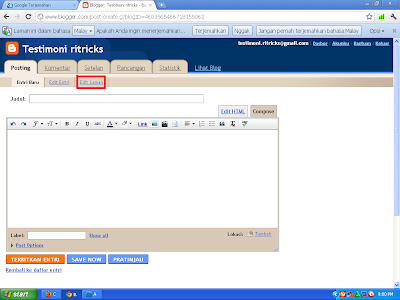
After you Sign In to Blogger, click New Menu Entries

 Third
Third
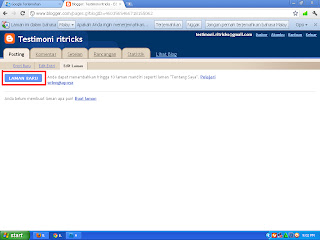
Click the New Page
Fourth
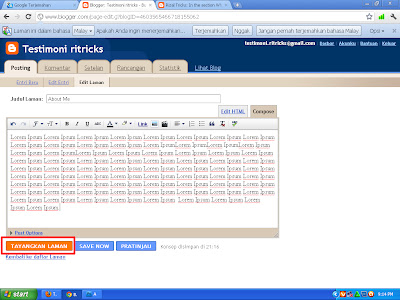
After you click the New Page, now write down what you think. For example write your personal data. If you have written click Publish Pages.
Now, Congratulations. Your page has so far published. Thank you for reading my article.
To Create a Home Page is very easy. Follow the instructionsfrom me.
First
Sign In at Blogger
After you Sign In to Blogger, click New Menu Entries

Second
After that, click again Edit Menu Page
After that, click again Edit Menu Page

Click the New Page


Fourth
After you click the New Page, now write down what you think. For example write your personal data. If you have written click Publish Pages.
Now, Congratulations. Your page has so far published. Thank you for reading my article.
In the section What to Edit After the Upload Template
Once you upload the template, your task is still unfinished. Youmust first edit the new template. For example, replace the defaultlink of the template. Or replace the navbar link. Then, how to edittemplates? It's easy. Follow the instructions from my
First
Sign In at Blogger
After you Sign In, Click Menu Design Then click the menu again EDIT HTML
Second
Once you open the menu EDIT HTML, Find the code is
To speed up the search using CTRL + F
<data:blog.title/> </ title>
Once you find the above code. Bottom of the code will have code like the one in the picture below

- Change the fill DESCRIPTION BLOG YOU with Your Blog Short Stories
- Change the Fill Keyword | Blog You the KEYWORDS that youspecify
Once replaced, the order will be like this
Third
To replace or add a navbar menu, find this code
As usual, to speed up the search, use the CTRL + F
<a href='http://testimoni-ritricks.blogspot.com' rel='nofollow'>Home </ a> </ li>
After the above code is found, replace the links that were therewith a link address of your blog.
To add a navbar menu, copy this code
<a href='#' rel='nofollow'> Title </ a> </ li>
and place it right under the code
<a href='http://testimoni-ritricks.blogspot.com' rel='nofollow'>Home </ a> </ li>
be a structure like this
<a href='http://testimoni-ritricks.blogspot.com' rel='nofollow'>Home </ a> </ li>
<a href='#' rel='nofollow'> Title </ a> </ li>
Description:
-Replace the # sign with your URL
-Replace Title with your URL
If so, click Save Template. And now you've finished template in the edit.
First
Sign In at Blogger
After you Sign In, Click Menu Design Then click the menu again EDIT HTML
Second
Once you open the menu EDIT HTML, Find the code is
To speed up the search using CTRL + F
<data:blog.title/> </ title>
Once you find the above code. Bottom of the code will have code like the one in the picture below

- Change the fill DESCRIPTION BLOG YOU with Your Blog Short Stories
- Change the Fill Keyword | Blog You the KEYWORDS that youspecify
Once replaced, the order will be like this
Third
To replace or add a navbar menu, find this code
As usual, to speed up the search, use the CTRL + F
<a href='http://testimoni-ritricks.blogspot.com' rel='nofollow'>Home </ a> </ li>
After the above code is found, replace the links that were therewith a link address of your blog.
To add a navbar menu, copy this code
<a href='#' rel='nofollow'> Title </ a> </ li>
and place it right under the code
<a href='http://testimoni-ritricks.blogspot.com' rel='nofollow'>Home </ a> </ li>
be a structure like this
<a href='http://testimoni-ritricks.blogspot.com' rel='nofollow'>Home </ a> </ li>
<a href='#' rel='nofollow'> Title </ a> </ li>
Description:
-Replace the # sign with your URL
-Replace Title with your URL
If so, click Save Template. And now you've finished template in the edit.
Uploading Template Method
Okay. On this occasion, I will give a tutorial on How to Upload Template. If in a previous post how to change my template from blogger, now is a way to replace the template with our own templates. So, if you want to change the template, no need to use a template from blogger, we also can replace with our own templates. Follow the instructions from me.
Things need to be prepared is, you should download the template first. You can download the template in the site template provider. As in Zoom Template
Blog Template 4 U
Or you can also download templates from me. You can dowonload HERE. Preview template is like this

While the appearance of the menu design is like this
 If you are interested, you can download it by clicking HERE. Templates are available with the AUTO READ MORE.
After you download, it's time you upload the template. First Sign In at http://www.blogger.com After you Sign In, please go to the menu design.

Second Once you open the Design menu, there will be a display like this.Click the EDIT HTML Menu


If there look like the picture below
 Click Delete Widget Because if not removed will be bad for our blog.
Fifth After the UPLOAD, there will be a notice like the picture below

The figure indicates that the template we have successfully replaced. Now see the look of your blog. Thank you for reading my article.
Things need to be prepared is, you should download the template first. You can download the template in the site template provider. As in Zoom Template
Blog Template 4 U
Or you can also download templates from me. You can dowonload HERE. Preview template is like this

While the appearance of the menu design is like this

After you download, it's time you upload the template. First Sign In at http://www.blogger.com After you Sign In, please go to the menu design.

Second Once you open the Design menu, there will be a display like this.Click the EDIT HTML Menu

Third Once you open the HTML EDIT menu, there will be a display like this. Then select the template you've downloaded by clicking the SELECT FILE.

Fourth Once you select a file, click UPLOAD like the picture below.


Fifth After the UPLOAD, there will be a notice like the picture below

The figure indicates that the template we have successfully replaced. Now see the look of your blog. Thank you for reading my article.
Subscribe to:
Posts (Atom)